
Managing refunds and disputes is an essential part of maintaining donor trust and accounting accuracy. This guide explains how to issue refunds and voids, what happens during chargebacks, and how ACH returns are processed.
Table of Contents:
Voids
A Void cancels a card transaction while it is still pending, so the money never actually leaves the donor's account, and the payment is treated as if it never happened. No processing fees are applied when the transaction is successfully voided.
Voiding Window
-
Transactions can only be voided within 3 hours of submission.
-
After 3 hours, you must issue a refund instead.
Why void instead of refund?
If the void window (3 hours after the transaction is submitted) is still open, voiding is optimal to prevent processing fees from being charged. Refunding a transaction, by contrast, reverses a payment after it has settled and requires the organization to cover the original processing fees for the donation.
How to Issue a Void
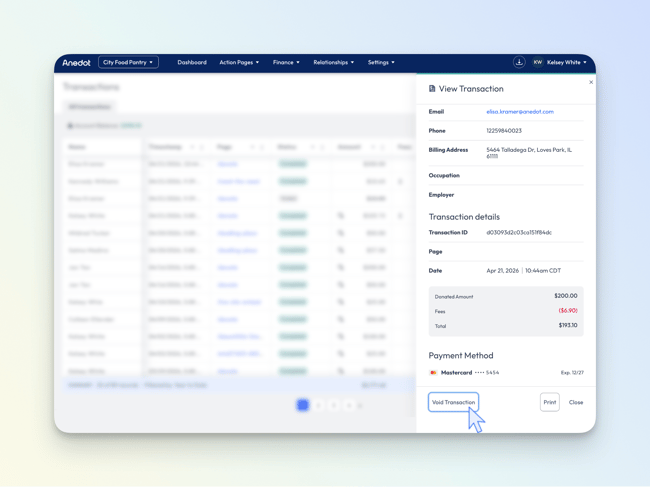
To issue a Void, follow the steps below:
-
Access the Finance > Transactions tab within your fundraising account.
-
Locate the donor's transaction.
-
Hover over the donor's name and click Actions > View.
-
The View Transaction drawer will open on the right side of the page; in the lower-left corner, select Void Transaction.
- If the void window has closed, the Void Transaction option will no longer appear and only Refund will be available.
- Next, select Confirm to issue the Void.
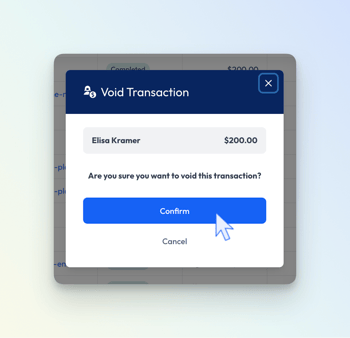
The status of the transaction will update from Completed to Voided in the Finance >Transactions index.
Refunds
Refunds allow you to reverse a completed transaction after it has already been processed. Refunding a transaction returns money to the donor’s original payment method and is typically used when a donor gives in error, is charged the wrong amount, or requests that their gift be reversed.
You can choose to issue either a Full Refund, which returns the entire donation amount, or a Partial Refund, which returns only part of the original donation when you need to correct the amount charged, or fulfill a donor’s request to refund only part of their gift.
Key Details:
-
Anedot does not charge refund fees.
- For donations submitted with an incorrect amount, you can issue a partial refund—eliminating the need for the donor to submit a new transaction.
-
However, Visa, MasterCard, PayPal, and others do not return processing fees—the organization absorbs those costs.
-
If the Donor Covers Fees feature was used, the full transaction amount—including the covered fees—is refunded to the donor, and the organization is responsible for the total fees.
When Refunds Cannot Be Processed:
When refunds cannot be processed in Anedot, the organization must issue the refund by check or another form of payment. A transaction may be non‑refundable in Anedot for several reasons: refunds are not allowed after 180 days, a partial refund has already been issued on the transaction, or the donor’s account associated with the original payment method has been closed. If the account is still open but the donor has updated their card or bank details, the refund can still be processed successfully using Anedot.
Bitcoin Donations:
Bitcoin transactions cannot be refunded through Anedot. Refunds must be issued outside the platform.
ACH Refunds:
ACH donations can only be refunded after 8 days, once the funds have cleared. Contact Support for assistance with ACH refunds.
How to Issue a Refund
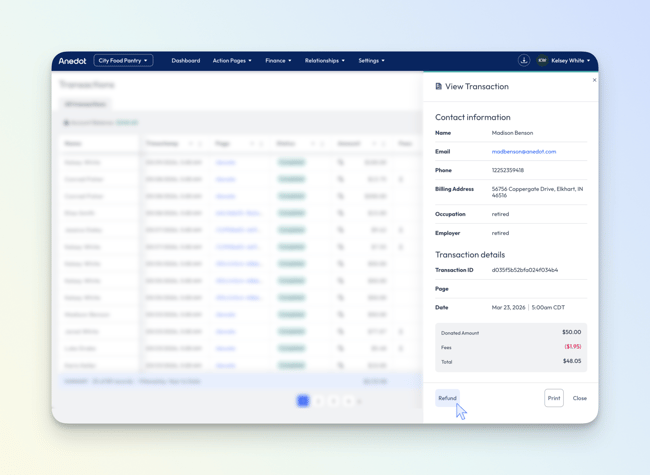
To issue a Partial Refund or Full Refund, follow the steps below:
-
Access the Finance > Transactions tab within your fundraising account.
-
Locate the donor's transaction.
-
Hover over the donor's name and click Actions > View.
-
The View Transaction drawer will open on the right side of the page; in the lower-left corner, select Refund.
-
Within the Refund pop-up, select Full Refund (default) or Partial Refund.
- When issuing a Partial Refund, enter the specific amount you want to return to the donor; this amount must be less than the original transaction amount.
Example: if a donor asks to have $25 of a $50 donation returned, enter $25 as the refund amount.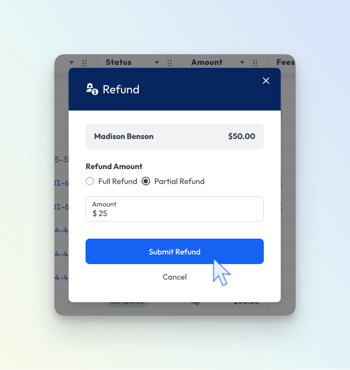
- When issuing a Partial Refund, enter the specific amount you want to return to the donor; this amount must be less than the original transaction amount.
- Next, select Submit Refund to issue the return.
The status of the transaction will update from Completed to Partially_refunded or Refunded in the Finance >Transactions index.
If the void window is still open (the first 3 hours after submission), the Refund option will not be available. It is recommended to issue a Void if you plan to return the full amount to the donor. If you need to issue a Partial Refund instead, you must wait until the void window has closed before you can do so.
What Happens After You Issue a Refund
When a refund is issued, an email notification is sent to the donor and to users on the fundraising account.
The refund is returned to the donor’s original payment method. Credits are typically posted within 2–3 business days, but the timing may vary by bank or card issuer and can take up to 30 days.
After the refund is submitted, the transaction status in Finance > Transactions will update from Completed to Partially_refunded or Refunded.
This status update may take a few seconds to 10 minutes while confirmation is received. Do not attempt to submit another refund for the same transaction during this time. If the status has not updated after 10 minutes, contact Support and include the relevant transaction details.
If a refund cannot be processed, an email notification is sent to users on the fundraising account.
Recurring Donations
Refunding a donation does NOT cancel an associated recurring commitment. If the donor does not want future recurring donations to process, cancel the recurring commitment separately in the Finance > Commitments tab.
Refunds After a Payout
If a refund is issued after the original donation has already been paid out, the refund amount is first deducted from any available balance in the fundraising account.
If the available balance is not enough to cover the refund, the account will show a negative balance. Future donations will be applied toward that balance automatically. If additional donations do not cover the negative balance, the remaining amount will be debited from the bank account on file.
Chargebacks and Disputes
A Chargeback occurs when a cardholder disputes a transaction with their bank or credit card issuer, typically claiming the charge was unauthorized or made in error.
Common Reasons for Chargebacks:
-
The transaction was not recognized by the donor
-
A duplicate charge was suspected
-
The donor believes there was fraudulent activity
-
The donor changed their mind and opted to dispute instead of requesting a refund
Recommended Action:
If your organization receives a chargeback, reach out to the donor to clarify the charge, as many disputes are filed by mistake. If the donor confirms the dispute was opened in error, they can contact their bank to cancel it.
Important Clarification:
If the dispute is reversed by the bank, the original donation amount will be reinstated in your Anedot account. However, the $15 chargeback fee is imposed by the card issuer and remains non‑refundable, even if the chargeback is successfully overturned.
How Anedot Handles Chargebacks:
A $15 fee is charged per dispute by the card issuer and passed through to your organization. This fee is non‑refundable, regardless of the outcome of the dispute. If the dispute is upheld, the donation is removed from your account. If the dispute is reversed and resolved in your favor, the donation is restored to your account, but the $15 fee still applies.
Credit card companies may take time to process both disputes and refunds, which can lead to timing overlaps. If a donor initiates a dispute after a refund has already been issued, a chargeback fee may still be applied by the card issuer. If this results in a duplicate refund, Anedot will automatically correct it so you are not charged twice for the same transaction.
For full details on chargeback responsibilities and fees, refer to Anedot’s Terms of Service.
ACH Returns
An ACH Return occurs when a bank draft (ACH) donation is returned by the donor's bank, usually because an issue prevented the bank from withdrawing funds. It is essentially the ACH version of a “bounced” check or failed transfer.
Though Anedot credits the donation amount upfront, the transfer remains pending for up to 8 days while the bank confirms it; if the bank rejects the transaction during this pending window, the ACH donation is returned and reversed.
Common Causes for ACH Returns:
-
Insufficient funds
-
Donor-initiated cancellation
-
Incorrect account information
How Anedot Handles ACH Returns
Anedot receives a notice from the issuing bank when an ACH transaction fails. Anedot then notifies both your organization and the donor, the previously credited donation amount is removed from your Anedot account, and a $2 ACH Return fee is applied.
For help managing ACH Returns, contact Support
Negative Balance
If a refund is issued when your Anedot account balance is insufficient, a Negative Balance will appear. Any new donations will automatically be applied to reduce this negative amount. If no new donations are received, Anedot will debit your connected bank account to cover the remaining balance.
Closing your account?
Contact Support before issuing refunds to avoid unresolved balances.